

Oxide Chat | Modern Chat System for QBCore
First impressions matter. Give your server a modern, immersive communication system built for serious roleplay.
Overview
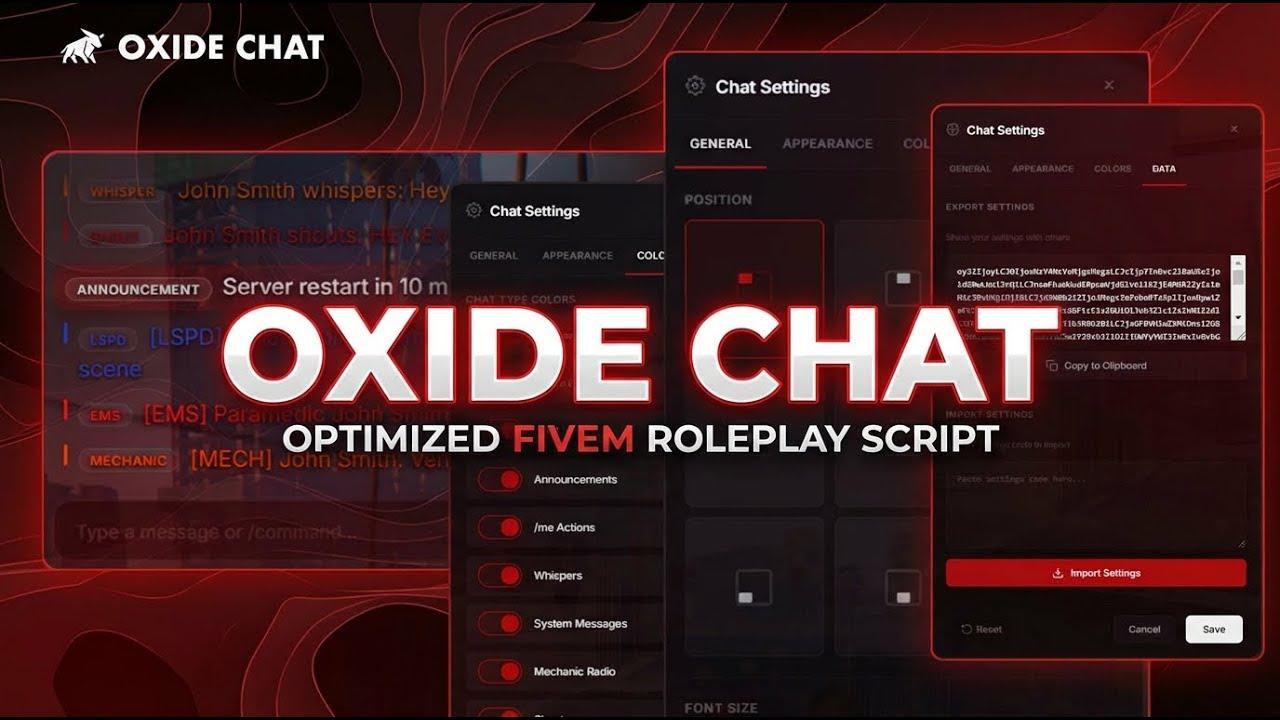
Oxide Chat is a complete chat overhaul for QBCore servers. Designed to replace the default FiveM chat experience, it features a sleek glassmorphic UI, immersive proximity chat with optional line-of-sight checking, dedicated job radio channels, and deep player customization.
This resource maintains full compatibility with the standard FiveM chat API, ensuring seamless integration with existing scripts and resources.
Escrowed | QBCore
Features
Modern UI
- Glassmorphic Design — Semi-transparent background with backdrop blur
- Smooth Animations — Clean fade-in and fade-out message transitions
- Custom Scrollbar — Styled to match the modern aesthetic
- Color-Coded Messages — Clear visual distinction between chat types
- Flexible Positioning — 9 presets plus custom X/Y placement
Proximity Chat
Immersive, roleplay-focused communication based on player distance.
/me— 15m — Roleplay actions/do— 15m — Environmental descriptions/whisper— 3m — Quiet speech/shout— 50m — Loud speech/looc— 20m — Local out-of-character
Line of Sight (Optional)
Optional visibility checks for maximum immersion.
- Raycast-based visibility detection
- Per-command configuration
- Players in the same vehicle are exempt
- Walls block
/meand/doby default
Job Radio Channels
Dedicated radio communication for emergency services and jobs.
- Police —
/lspd,/pd,/police - EMS —
/ems,/ambulance - Mechanic —
/mechanic,/mech - Extensible — Easily add custom channels (taxi, news, etc.)
Message Format Example:[LSPD] John Smith (Sergeant): Responding to the scene
Private Messaging
/msg [id] [message]— Send a private message/replyor/r— Quick reply to last message- Server-validated recipients
- Reply tracking with cleanup on disconnect
Chat Settings Panel
Every player controls their own experience via /chatsettings.
- Position, font size, fade timing, timestamps
- Opacity, blur intensity, width, and message density
- Toggle animations and individual chat types
- Per-type color overrides
- Import and export settings via base64
Command Autocomplete
- Smart command suggestions while typing
- Displays descriptions and parameters
- Keyboard navigation (Up/Down, Tab to accept)
- Internal and debug commands automatically hidden
Rate Limiting
- Chat — 1 second
- Proximity — 1.5 seconds
- OOC — 5 seconds
- Private Messages — 1 second
- Announcements — 30 seconds
Security
- Server-Side Validation — All messages validated server-side
- Message Sanitization — Control characters stripped
- Length Limits — 256 character maximum
- Job Verification — Server confirms job for radio channels
- Name Spoofing Protection — Names fetched directly from QBCore
- Cooldown Enforcement — Rate limits enforced server-side
- Memory Safety — Automatic cleanup on player disconnect
Compatibility
Fully compatible with the standard FiveM chat API.
exports['chat']:addMessage(source, { args = { 'Hello!' } })
exports['oxide-chat']:addMessage({ args = { 'Hello!' } })
Supported Events:
- chat:addMessage
- chat:addSuggestion / chat:addSuggestions
- chat:removeSuggestion
- chat:clear
- chat:addTemplate
- chatMessage
Requirements
- qb-core
Installation
- Purchase and download from Keymaster
- Extract oxide-chat to your resources folder
- Remove the default chat resource from
server.cfg - Add
ensure oxide-chattoserver.cfg - Configure settings in the config folder
- Restart your server
Modern design. Serious roleplay. Zero compromises.
Oxide Chat makes every message count.
Oxide Chat by Oxide Studios