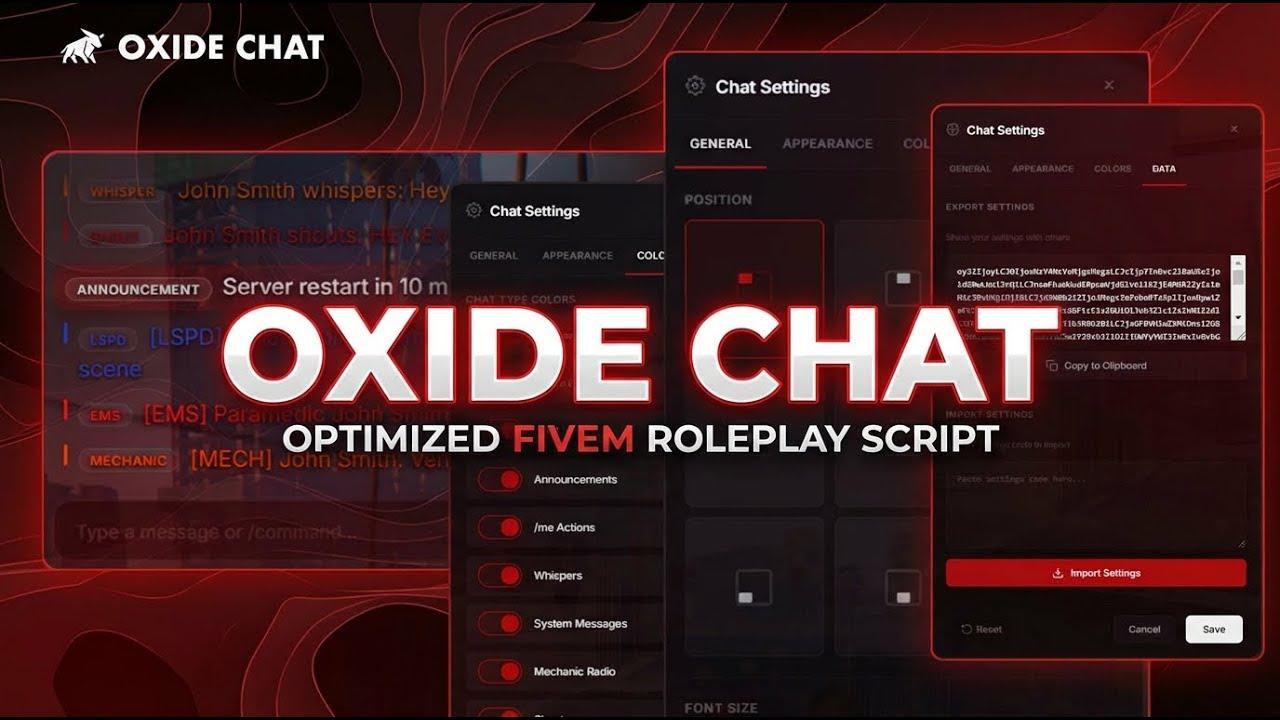
OXIDE CHAT | Modern Chat System video preview
Watch Video
OXIDE CHAT | Modern Chat System - Image 1

OXIDE CHAT | Modern Chat System

Framework Agnostic
GA
TO
JD
SD
JU
Recent customers
$14.99

▸ Or get everything

All Access unlocks all 23 resources for $39.99/mo.

Try free for 7 days
Framework
Framework Agnostic
Last UpdatedSep 3, 2026
Oxide StudiosOxide Chat
Roleplay Chat Infrastructure

Replace the stock chat.
Nothing else breaks.

A complete replacement for the default FiveM chat. It drops in with a full compatibility layer, so every script that posts messages or registers command suggestions keeps working, and adds proximity roleplay commands, job radios, private messages, custom channels, and a database-backed settings panel that admins edit in-game with no file edits or restarts.

  • QBCore · QBX · ESX via o-link
  • Replaces the default FiveM chat
  • Configured in-game, no restarts
$14.99
Read the docs →

10

Style presets

5

Proximity RP commands

8

Preset chat positions

4

Channel scopes

[ 01 ]

Say it in range, or on the radio.

Five proximity commands deliver only to players within range, with optional line-of-sight. Global and local OOC, private messages with reply tracking, and police, EMS, and mechanic radios round out the defaults.

  • /me and /do reach 15m, /whisper 3m, /shout 50m, and /looc 20m, with every range editable
  • Optional line-of-sight on /me and /do, and players in the same vehicle are always exempt
  • /msg, /pm, or /dm a player by ID, then /reply to whoever messaged you last
  • Job radios validate the sender's job on the server and show name and grade on every message
[ 02 ]

New channels without a restart.

Any number of slash-command channels are created from /chat settings, which keeps server-wide configuration in the database and pushes changes to every connected player the moment you save.

  • Each channel sets its own command, aliases, prefix, color, italics, and per-player cooldown
  • Four scopes: members only, everyone, members send and everyone sees, or nearby players
  • Restrict a channel to specific jobs with a minimum grade and on-duty requirement, or to admins only
  • Access is enforced on the server, and the stock police, EMS, and mechanic radios are editable rows
[ 03 ]

Put the chat where you want it.

Every player opens /chat customize and picks one of eight preset positions or drags the panel anywhere. Font size, fade time, timestamps, and where command suggestions appear are personal settings too.

  • 8 preset positions on a 3x3 grid, or custom coordinates by dragging
  • Font size 12-20px and message fade from 0 to 30 seconds, where 0 means messages never fade
  • Timestamps always, on hover, or never, in 12-hour or 24-hour format
  • Settings save automatically on the player's own machine and follow them between sessions
[ 04 ]

Ten looks, one chat.

Style presets restyle the whole feed and input box, from iMessage-style Bubbles to a dense Compact log to plain Retro text lines. Changes preview live before saving.

  • Bubbles, Discord, Timeline, Masonry, Compact, Cards, Float, Panel, Retro, and Glass presets
  • Background opacity 0-100%, chat width 320-640px, and message-area height 160-600px
  • Compact, comfortable, or spacious message density, with message animations on or off
  • Category tab bar (All, Local, Global, Job, PMs by default) can be hidden per player
[ 05 ]

Recolor it, or hide it.

The Colors tab lists every chat type on the server, built-in and custom, with a visibility toggle and a color override each. Admins set the defaults everyone starts with, and players adjust their own view.

  • Per-type visibility toggle and color override for /me, /do, OOC, whispers, shouts, radios, and more
  • Custom channels appear in every player's Colors tab automatically, using the channel's label and color
  • Server-wide default colors, prefixes, and italics are edited live under Messaging, Chat Types
  • /chat test sends one sample of every chat type so admins can check colors at a glance
[ 06 ]

Social tools players expect.

An emoji picker and a Giphy GIF button sit beside the input, direct image links embed inline from approved hosts, typing @ autocompletes online players with Discord-style highlighting, and a friends and block list persists per character.

  • Giphy searches run on the server, so the API key never reaches players
  • .png, .jpg, .jpeg, .gif, and .webp links embed in any message type from whitelisted hosts only
  • Image sending can be limited to specific jobs or admins, with its own per-player cooldown
  • Consent-based friend requests, online presence notifications, and two-way PM blocking
[ 07 ]

In the
field.

More of Oxide Chat as players see it. Click any capture to enlarge.

  • Data tab: export or import a settings code

[ 08 ]

What's in
the box.

One resource. One install.

Everything below ships together, with full documentation for setup, configuration, and admin tooling.

Included
  • Drop-in provide 'chat' compatibility layer
  • 5 proximity roleplay commands with line-of-sight
  • Global and local OOC, private messages with /reply
  • Police, EMS, and mechanic job radios
  • Custom slash-command channels built in-game
  • Persistent per-character friends and block list
  • @mention autocomplete
  • Category tabs (All, Local, Global, Job, PMs)
  • Inline images and Giphy GIF picker
  • Automatic rotating announcements
  • 10 style presets and per-player settings
  • Live database-backed admin panel (/chat settings)
  • Server-side sanitization and rate limiting
Runs on
QBCoreQBXESX
Requires
  • o-link
  • ox_lib
  • oxmysql
Documentation
[ 09 ]

Give your server a chat worth reading.

One resource replaces the stock chat with proximity roleplay commands, job radios, private messages, custom channels, ten style presets, and a settings panel admins edit live in-game. Every existing script keeps posting messages through the compatibility layer.

  • Delivered through Tebex
  • Documentation included
  • Discord support
Oxide Studios

Oxide Chat

Roleplay Chat Infrastructure

Proximity. Radios. Channels. Configured in-game.

Oxide Studios